
Feel-Fast Next.js
Making a Next.js App Feel Fast by Deleting Accidental Work
We had a production app that should have felt quick. The frontend was relatively straightforward. The operational state lived in Convex. The routes were not doing anything exotic. And yet the app, especially the admin screens, felt slower than it had any right to feel.
That gap between expectation and experience turned out to be the whole story.
I'll be honest; I got a little loosey-goosey with the architecture initially. The lower dB is a reader-facing content site where speed obviously matters for reader trust and engagement, not to mention being SEO-friendly. By the time I came back to look at performance, there was a mess in aisle 3 and I had to bust out the mop.
Measure first, optimize second
The first useful move was not optimization. It was measurement. We added a lightweight baseline layer for web vitals, navigation timing, and route-transition events, then pushed those signals into PostHog so we had one place to compare before-and-after behavior. We built a Playwright-based benchmark runner that could capture route timings automatically across both the public site and the authenticated admin surfaces, writing results to repo-tracked JSON artifacts so every comparison was reproducible.
That gave the project a spine. Without it, every performance conversation would have stayed fuzzy and subjective. "It feels slow" is not a diagnosis. And it turned out that even the measurement infrastructure would teach us something important later.
The admin screens were doing work they didn't need to do
Once we looked at the admin surfaces closely, the biggest problem was obvious: our list views were doing detail-page work. The admin dashboard and inbox were rebuilding full review workspace state for every job in the queue, even though the admin user only needed a lightweight summary to decide where to click next.
This is the kind of accidental architecture that makes a system feel mysteriously slow. Nothing is broken. The app is just doing expensive work at the wrong level.
We fixed it by separating summary-path data from artifact-path data. The dashboard and inbox now render from stored job summaries instead of hydrating full review workspaces row by row. The job detail page got the same treatment: the review-critical shell renders first, and heavier sections like the full fact-check output, edit reports, and artifact history stream in behind it using Suspense boundaries.
In practice, the admin pages went from loading everything about every job upfront to showing just enough to scan the queue quickly. The heavy details only load when you actually click into a specific job.
The prompt admin pages had the same shape of problem. The prompt detail route was loading sync records, candidate comparisons, diffs, and recent eval examples before the page could feel usable. We split that into a fast shell and deferred sections. The data didn't disappear. The admin user just gets the useful part of the page first.
The real speed win here was not a fancy cache. It was deleting accidental work from the list path.
Auth was loading on pages that don't have auth
The follow-up pass turned up something broader. We'd gone back in because /treatments, one of our public directory pages, hadn't improved the way other public routes had. The first guess was that the page was still rendering too much content on the initial view.
That was part of it. But the bigger finding came from looking at the app shell itself: public pages were still paying for Clerk.
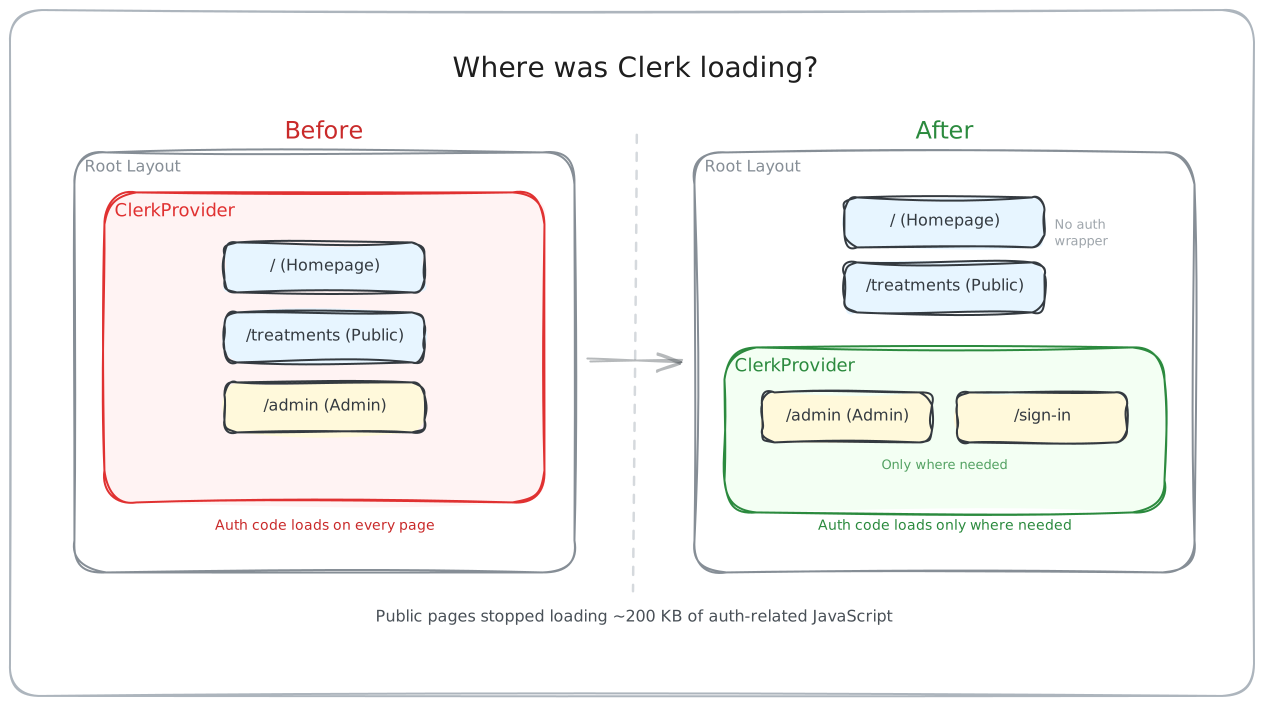
The root layout still mounted ClerkProvider across the entire app. Global analytics depended on Clerk's useUser() hook for PostHog user identification. Clerk middleware was running on nearly every non-static route, even though only /admin actually needs server-side auth protection.
In short, every page on the site was loading login-related code and running authentication checks, even the reader-facing pages where no one ever logs in.
That kind of leak is easy to miss because nothing looks obviously wrong in the product. There's just a background tax on every page load. Once we moved ClerkProvider into the admin and sign-in surfaces only and narrowed the middleware scope to /admin, local production traces for the homepage and /treatments no longer showed Clerk assets among the largest resources on public pages.
The interesting part of this pass was not the route we started investigating. It was discovering that auth infrastructure had leaked into pages that didn't need it.
The benchmarks were measuring the wrong page
The most embarrassing discovery was the most useful one. Some of the preview benchmark data we'd been analyzing didn't make sense. Numbers sometimes moved in ways that didn't match the code changes or the local traces. The /treatments route kept looking worse on preview even though local production builds were clearly faster.
It turned out our Playwright benchmark harness was quietly timing Vercel's Deployment Protection login page instead of our actual app routes. The preview deployments were protected, and the harness wasn't checking response codes. It was just measuring whatever loaded.
We fixed the harness so it now fails loudly on 401 and 403 responses and only benchmarks protected previews when a bypass secret is configured. After that, the treatments route finally showed the improvement the architecture changes predicted: median DOMContentLoaded dropped by about 223ms, load by about 407ms, and LCP by about 396ms compared to production.
Sometimes the lesson is not "this optimization failed." Sometimes the lesson is "your benchmark was measuring the wrong thing."
What actually moved the numbers
The app didn't need one magical optimization. It needed a series of smaller corrections that all came from the same underlying question:
- Stop doing detail work in list views. Summary data for lists, full artifacts for detail pages.
- Render the decision-critical shell first. Let everything else stream in.
- Let URLs and the server handle filtering and selection instead of shipping client JavaScript for it. The treatments filter that used to run through
useStatenow runs from the URL on the server. - Make loading visible instead of silent. We added explicit loading shells for key routes so transitions show progress rather than blank stalls.
- Keep auth infrastructure out of pages that don't need it.
- Stop paying for route prefetching on content-heavy pages. Background fetches on the homepage and directory pages went to zero after we disabled prefetch on the densest link clusters.
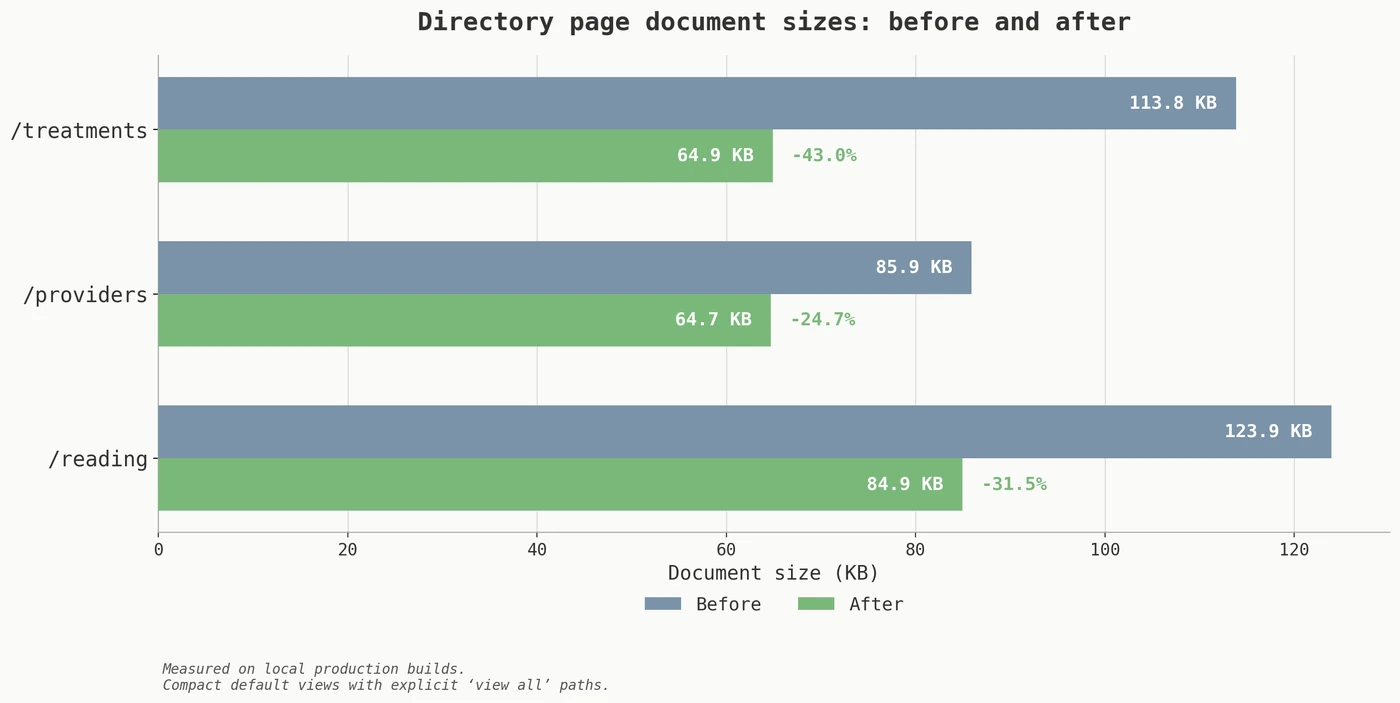
On the public routes, the production before-and-after pass showed real gains: homepage load improved by roughly 194ms, company detail by 310ms, the reading index by 258ms on DOMContentLoaded. Document sizes dropped 25-43% on the directory pages after we switched to compact default views with explicit "view all" paths. Several of those routes also became fully static after we restructured them to stop depending on URL query parameters, which alone cut their median page-ready time nearly in half in local production builds.
The honest question
The biggest performance wins came from asking a more honest question. Not "how do we make this code faster?" but "why is this code running here at all?"
That question applies to auth providers on public pages, to list views reconstructing detail-level state, to prefetch behavior warming routes nobody asked for, and to benchmarks running against the wrong target. The code was not slow. It was in the wrong place.
If I'd thought more carefully about these boundaries from the start, there would have been less mopping up to do. But I think this kind of accidental drift is common in projects that move fast early and circle back to performance later. The fix is not to agonize over every dependency on day one. It's to build the measurement loop that tells you when the architecture has drifted, and then to ask the honest question when it does.